System environment overview
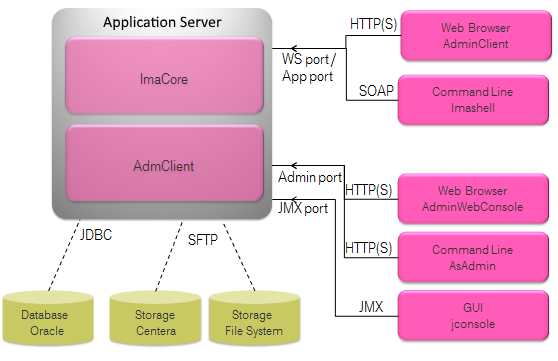
Figure 292: System environment overview
The above diagram shows an example ImageMaster system environment set up on an application server. As the diagram shows the ImageMaster system provides three ports as interfaces:
-
The Admin port is used to configure the application server.
-
The JMX port is used to monitor and control the state of the application server JVM. It is also used to administer the JMS ARM queue (see chapter Advanced topics for details).
-
The WebService port (WS port) or also called application port (App port) is used to connect to the Integration Service, which also provides the ImageMaster AdminClient (AdmClient).
In the ImageMaster ARM context at the front end the IMA Shell command line tool is used to access the Integration Service ARM web service commands, as it is detailed in the examples throughout this document. Furthermore, a web browser is used to access the ImageMaster AdminClient application to administer the ImageMaster system.