SAP Messenger queues dashboard
The SAP Messenger Queues dashboard page provides status information about the SAP Messenger status and allows searching for transfer items.
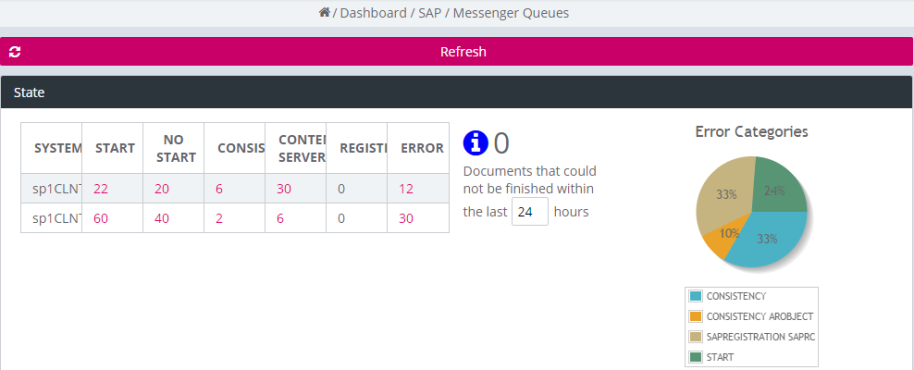
Figure 272: Dashboard – SAP: Messenger queues
The State panel contains statistical information grouped in the following sections:
-
The messenger status table shows accumulated information about item status grouped by the SAP clients. The following values are shown:
-
SYSTEM: the name of the SAP client
-
START: the number of documents in state START
-
NOSTART: the number of documents in state NOSTART
-
CONSISTENCY: the number of documents in state CONSISTENCY
-
CONTENTSERVER: the number of documents in CONTENTSERVER
-
REGISTERED: the number of documents that have been successfully registered to SAP
-
ERROR: the number of documents in state ERROR
-
-
Unfinished items:
If the state table contains items that have not been registered in SAP within the last 24 hours, the number is shown besides the table. This number is calculated based on all items (of all SAP clients) that are not in state SAPREGISTERED having a creation date before the given time frame. The initial time frame is 24 hours.
To change the time frame, set another time period in hours in the input field. When you leave the input control, the number is updated immediately, or click “Refresh” to refresh the dashboard data. If the number is zero, the information is not shown at all. If it is greater than zero, the number is displayed as a link to search for all affected documents.
-
Error categories:
If there are error items in the state table, associated types with the number of occurrences are shown in a pie chart. Clicking on a partition again starts a search for error items of the selected error category (see the section below for more information). The pie chart is not shown if the total error number is zero.