Initialize
In the Initialize step the incoming data to be processed is received and analyzed for acceptance. Only the file structure and the filenames are checked, whereas the content is not relevant.
JobMode 1
|
Parameter |
Value |
|---|---|
|
File Number |
1 |
|
Source File |
<DataInputPath>/<SpoolType>.<Generation> |
|
Output |
<ColdSpoolBaseDirectory>/<SpoolType>/<SpoolType>.<Generation>/<SpoolType>.<Generation> |
|
Configuration Parameters |
|
|
Table 123: Initialize: JobMode 1 |
|
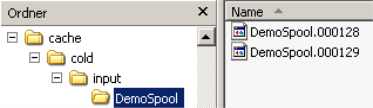
The filename in the source directory must consist of the spool name <SpoolType> and the generation <generation>. All other files are ignored. Only one file is processed per generation. There is no belonging content file.
JobMode 20
|
Parameter |
Value |
|---|---|
|
File Number |
1 - <MaximumFilesSpool> |
|
Source File |
<DataInputPath>/*.* or [<FileNamePrefixString>]*.<DataFileExtension> |
|
Output |
<ColdSpoolBaseDirectory>/<SpoolType>/<SpoolType>.<Generation>/*.* |
|
Configuration Parameters |
|
|
Table 124: Initialize: JobMode 20 |
|
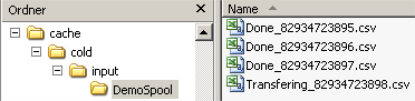
This JobMode accepts any source files. The maximum number can be limited <MaximumFilesSpool>. Files can be filtered by a prefix in the filename <FileNamePrefixString> and by file extensions <DataFileExtension>, where also multiple different file extensions separated by a blank can be specified.
Directories within the spool are ignored. Indexing files of size 0 can be ignored <ZeroByteFileCheck>.
The creation of Pre-Processing jobs, which are considered too small, can be avoided by making the system wait until a minimum number of source files is available <MinimumStartFileCount>. To avoid a too long delay if not enough files arrive on time, this mechanism can be overridden by setting a maximum waiting time interval <MaximumStartDelayMinutes>.
|
Parameter |
Value |
|---|---|
|
File Number |
1 - <MaximumFilesSpool> |
|
Source File |
<DataInputPath>/*.<IndexFileExtension> <DataInputPath>/*.<DataFileExtension> |
|
Output |
<ColdSpoolBaseDirectory>/<SpoolType>/<SpoolType>.<Generation>/*.* |
|
Configuration Parameters |
|
|
Table 125: Initialize: JobMode 21 |
|
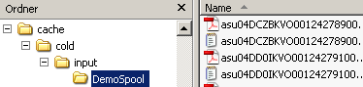
In this JobMode an indexing file must always be accompanied by a content file. A maximum number of files can be specified, which is accepted in one generation of the spool <MaximumFilesSpool>. A mask can be specified to filter indexing files by a filename pattern <FileNameMask>. Indexing files of size 0 can be ignored <ZeroByteFileCheck>.
|
Parameter |
Value |
|---|---|
|
File Number |
1 directory with any number of files |
|
Source File |
<DataInputPath>/directory[.<InputDirectoryExtension>]/*.* or |
|
Output |
<ColdSpoolBaseDirectory>/<SpoolType>/<SpoolType>.<Generation>/*.* |
|
Configuration Parameters |
|
|
|
|
|
Table 126: Initialize: JobMode 22 |
|
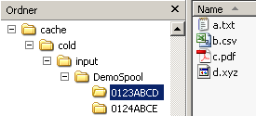
This JobMode looks for exactly one directory in the input folder and copies this with its complete content into the spool directory. The number of files does not matter. Any number of subdirectories can exist, which will also be copied.
If a start job filename is specified <StartJobFileName> the directory is only copied if this file exists within the directory.
If an input directory extension is specified <InputDirectoryExtension> the directory name must end with this string to be accepted in the spool.
The start of the directory copy operation can be delayed until a minimum number of subdirectories is available <CheckInfoAmountFile>.
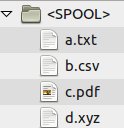
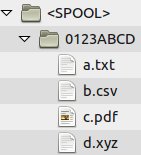
You can control if the directory structure should be kept as it is (KeepDirectoryStructure=Yes) in the spool directory, or if the subdirectory shall be removed (KeepDirectoryStructure=No).
|
KeepDirectoryStructure=No |
KeepDirectoryStructure=Yes |
|---|---|
|
|
|
JobMode 23
|
Parameter |
Value |
|---|---|
|
File Number |
Many directories with at least one file |
|
Source File |
<DataInputPath>/directory[.<InputDirectoryExtension>]/*.* |
|
Output |
<ColdSpoolBaseDirectory>/<SpoolType>/<SpoolType>.<Generation>/Verzeichnis/*.* |
|
Configuration Parameters |
|
|
Table 127: Initialize: JobMode 23 |
|
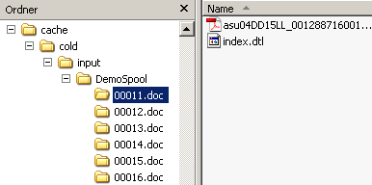
This JobMode looks for directories with a specific extension <InputDirectoryExtension> in their name in the input folder, and it copies such directories either into the spool directory or directly into the docs directory <DataInputToDocsDirectory>.
Empty directories are not copied. The maximum number of directories per generation can additionally be limited <MaximumFilesSpool>.
|
Parameter |
Value |
|---|---|
|
File Number |
1 - <MaximumFilesSpool> |
|
Source File |
<DataInputPath>/*.<CheckInfoAmountFileNameExt> <DataInputPath>/*.<DataFileExtension> |
|
Output |
<ColdSpoolBaseDirectory>/<SpoolType>/<SpoolType>.<Generation>/*.* |
|
Configuration Parameters |
|
|
Table 128: Initialize: JobMode 24 |
|
This JobMode is identical with JobMode 21, but instead of the indexing file extension <IndexFileExtension> the info amount file extension <CheckInfoAmountFileNameExt> is used. This can be required if a compressed file and an OK file are delivered in the Initialize step, and only by unpacking the compressed file the indexing files with their extensions become available. In the example below the info amount file extension “.ok” is the relevant trigger (instead of the indexing file extension “.csv”):
Delivered data: 0000001.tar.gz 0000001.ok
Extracted data: ABCD.pdf ABCD.csv EFGH.pdf EFGH.csv
JobMode 31
|
Parameter |
Value |
|---|---|
|
File Number |
n Index file(s) with any number of data files starting with the same prefix |
|
Source File |
<DataInputPath>/(anyPrefix).<IndexFileExtension> <DataInputPath>/(anyPrefix)*.* |
|
Output |
<ColdSpoolBaseDirectory>/<SpoolType>/<SpoolType>.<Generation>/*.* |
|
Configuration Parameters |
|
|
Table 129: Initialize: JobMode 31 |
|
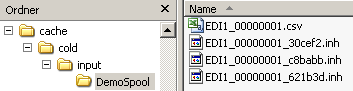
The JobMode takes over <MaximumFilesSpool> index files into the spool together with all associated data files. These data files must start with the complete filename apart from the file extension of the index file. In the example above this is the prefix “EDI1_00000001”. There can be any number of data files per index file.
The <FileNameMask> parameter can be used to define a mask for index files. If the <ZeroByteFileCheck> parameter is active, all index files without content are ignored.
JobMode 50 – module HRDMS
This JobMode is contained in a module package, which can be included in cold.<SpoolType>.ini as follows:
IncludeExternalModule = HRDMS::ZRK
Since the package is customized, the currently specified values are listed in the parameter overview as well.
|
Parameter |
Value |
|---|---|
|
File Number |
1 - <MaximumFilesSpool> |
|
Source Files |
The input paths are specified by the parameters ZRK<number>_DataInputPath |
|
Output |
See examples below |
|
Configuration Parameters with Customized Default Values |
<DataFileExtension> = zip <IndexFileExtension> = ok <MaximumFilesSpool> = 20 <MinimumStartFileCount> = 0 <MaximumStartDelayMinutes> = 30
Module-specific parameters: ZRK1_DataInputPath = <ColdInputBaseDirectory>/<SpoolType>/AMS_VM ZRK1_SpoolType = AMS_VM ZRK2_DataInputPath = <ColdInputBaseDirectory>/<SpoolType>/AMS ZRK2_SpoolType = AMS ZRK3_DataInputPath = <ColdInputBaseDirectory>/<SpoolType>/SAPRM ZRK3_SpoolType = SAPRM ZRK4_DataInputPath = <ColdInputBaseDirectory>/<SpoolType>/MEDAT ZRK4_SpoolType = MEDAT |
|
Table 130: Initialize: JobMode 50 – module HRDMS |
|
Example input before Initialize:
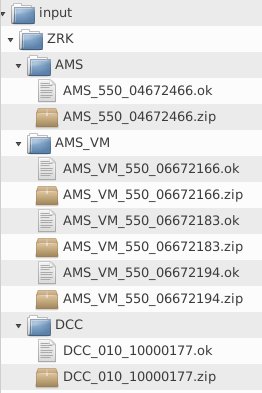
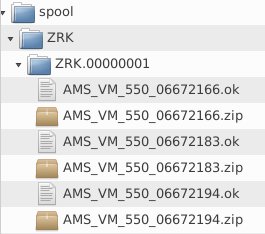
Example spool after initialize: