Transfer
|
Parameter |
Value |
|---|---|
|
File Number |
1 - <MaximumFilesSpool> |
|
Source File |
<TransShare>[/<TransWorkDir>]/*.< IndexFileExtension> <TransShare>[/<TransWorkDir>]/*.< DataFileExtension> |
|
Output |
<DataInputPath>/*.* |
|
Configuration Parameters |
<TransCreateReadyFile> |
|
Table 179: Transfer: JobMode 1 – smbclient |
|
This JobMode connects to a file share with the tool “smbclient” to fetch files matching the pattern specified by <TransFileNameMask>. In case of a successful transfer these files are put into the directory <DataInputPath> and deleted from the file share, so they can next be used by the Initialize step.
In general, pairs of files are transferred (*.<IndexFileExtension> + *.<DataFileExtension>). In order to be able to determine a correct age of the files (for further synchronization purposes), a directory is created on the file share and only such files are transferred, which are older than this directory. Consequently, it can happen that the script works correctly only in the second call (if this directory already exists).
The maximum number of files to transfer can be limited by <MaximumFilesSpool>.
Entries for all transferred files are logged in the file specified by <TransAcceptLogFile>, if this parameter is set.
JobMode 11 – SFTP get pair
|
Parameter |
Value |
|---|---|
|
File Number |
|
|
Source File |
sftp://<TransShare>[:/<TransWorkDir>]/<TransFileNameMask> (bzw. *.< IndexFileExtension>) sftp://<TransShare>[:/<TransWorkDir>]/*.< DataFileExtension> |
|
Output |
<DataInputPath>/<TransFileNameMask> <DataInputPath>/*.< DataFileExtension> |
|
Configuration Parameter |
<TransCreateReadyFile> <TransDestroyFileExtension> <TransRequiredFreeDiskSpaceOrRetry> |
|
Table 180: Transfer: JobMode 11 – SFTP get pair |
|
This JobMode fetches files via an external SFTP tool (i.e. no internal Perl implementation is used).
This JobMode is based on automated file transfers, which requires the setup of public/private key authentication without a password (cue: ssh-keygen -t rsa).
A connection to <TransShare> is established and the directory <TransWorkDir> is changed into. All files matching the pattern <TransFileNameMask> (which represents a regular expression) are processed. If this mask pattern is not set, *.<IndexFileExtension> is used. <TransFileNameMask> must point to the indexing file. If an indexing file is found, it is checked whether the matching file is available in the remote location. The corresponding pair of files is copied to a temporary directory and the file size is compared with the expected size. Successfully received files are moved into <DataInputPath> and deleted in the remote location.
If the parameter <TransTimeStampCheckDir> is set, a directory with this name is created in the remote location to obtain the time from this remote system. This allows handling files with a minimum age based on <LastModificationTime>.
If the parameter <TransDestroyFileExtension> is set, files with such an extension are discarded after the transfer and only the remaining files are moved to <DataInputPath>.
With <TransRequiredFreeDiskSpaceOrRetry> set to “Yes” in case of insufficient disk space, processing is halted in state “Retry” instead of being stopped with an error state.
Example configuration for sftp://sysadm@53.113.173.116:/cache/input:
TransBinary        = /bin/sftp
TransUserName      = sysadm
TransShare         = 53.113.173.116
TransWorkDir       = /cache/input
IndexFileExtension = txt
DataFileExtension  = pdf
TransFileNameMask  = [0-9]+\.<IndexFileExtension>
TransAcceptLogFile = <ColdLogsBaseDirectory>/<SpoolType>/trans_<SpoolType>.log
ZeroByteFileCheck  = No
LastModificationTime = 0.007
TransTimeStampCheckDir = timestamp<SpoolType>
TransRequiredFreeDiskSpaceOrRetry = Yes
|
Parameter |
Value |
|---|---|
|
File Number |
1 – <MaximumFilesSpool> |
|
Source File |
sftp://<TransShare>[:/<TransWorkDir>]/<TransFileNameMask> |
|
Output |
<DataInputPath>/<TransFileNameMask> |
|
Configuration Parameters |
<TransCreateReadyFile> |
|
Table 181: Transfer: JobMode 12 – SFTP get |
|
This JobMode fetches files via an external SFTP tool (i.e. no internal Perl implementation is used).
This JobMode is based on automated file transfers, which requires the setup of public/private key authentication without a password (cue: ssh-keygen -t rsa).
A connection to <TransShare> is established and the directory <TransWorkDir> is changed into. All files matching the pattern <TransFileNameMask> are copied into a temporary directory and file sizes are verified with an expected size. Successfully received files are moved into <DataInputPath> and deleted in the remote location.
If the parameter <TransTimeStampCheckDir> is set, a directory with this name is created in the remote location to obtain the time from this remote system. This allows handling files with a minimum age based on <LastModificationTime>.
Example configuration for sftp://sysadm@53.113.173.116:/cache/input
TransBinary        = /bin/sftp
TransUserName      = sysadm
TransShare         = 53.113.173.116
TransWorkDir       = /cache/input
TransFileNameMask  = [0-9]+\.<IndexFileExtension>
TransAcceptLogFile = <ColdLogsBaseDirectory>/<SpoolType>/trans_<SpoolType>.log
LastModificationTime = 0.007
TransTimeStampCheckDir = timestamp<SpoolType>
JobMode 14 – FTP
|
Parameter |
Value |
|---|---|
|
File Number |
1 – <MaximumFilesSpool> |
|
Source File |
sftp://<TransShare>[:/<TransWorkDir>]/<TransFileNameMask> |
|
Output |
<DataInputPath>/<TransFileNameMask> |
|
Configuration Parameters |
<DataInputPath> <MaximumFilesSpool> <TransAcceptLogFile> <TransBinary> <TransCreateReadyFile> <TransferMode> <TransFileNameMask> <TransIgnoreConnectErrors> <TransMoveTransferedFilesTo > <TransShare> <TransTimeStampCheckDir> <TransUserName> <TransUserPass > <TransWorkDir> |
|
Table 182: Transfer: JobMode 14 – FTP |
|
This JobMode fetches a complete remote directory via an external FTP tool (i.e. no internal Perl implementation is used).
If a start job file is specified by <StartJobFileName> the transfer is delayed until this file pops up and the file has the corresponding age. To determine the time in the remote location, a directory with the name <TransTimeStampCheckDir> is temporarily created, whose creation time is read, before it is deleted again.
If <StartJobFileName> is empty, the age of the directory is used as the criterion to start and in this case at most one directory is downloaded.
With the option <TransIgnoreConnectErrors> you can deactivate the error notification which is sent by default in case of a connection error. Use this option carefully in a newly installed system and preferably only activate this after at least one successful connection has been verified with this specific remote server.
The parameter <TransferMode> specifies one of the supported FTP modes “binary” or “ascii”.
If a directory is specified by <TransMoveTransferedFilesTo> the remote peer directory is not deleted but moved into this specified directory. This allows a backup on the remote peer.
Example configuration for ftp://sysadm@53.113.173.116:/cache/input
TransBinary        = /bin/ftp
TransUserName      = sysadm
TransUserPass	= pass
TransferMode		= ascii
TransShare         = 53.113.173.116
TransWorkDir       = /cache/input
TransFileNameMask  = [0-9]+\.<IndexFileExtension>
TransAcceptLogFile = <ColdLogsBaseDirectory>/<SpoolType>/trans_<SpoolType>.log
TransMoveTransferedFilesTo =
TransTimeStampCheckDir = timestamp<SpoolType>
JobMode 15 – SFTP directory get
|
Parameter |
Value |
|---|---|
|
File Number |
1 – <MaximumFilesSpool> |
|
Source |
sftp://<TransShare>[:/<TransWorkDir>]/<TransFileNameMask>/ * |
|
Output |
<TransInputDirectory>/<TransFileNameMask>/ * |
|
Configuration Parameters |
<LastModificationTime> <StartJobFileName> <TransCreateReadyFile> <TransFileInfoMask> <TransIgnoreConnectErrors> <TransInputDirectory> <TransMaximumDirsDownload> <TransTimeStampCheckDir> |
|
Table 183: Transfer: JobMode 15 – SFTP directory get |
|
By default, this JobMode transfers a single directory completely including all of its files via SFTP. The directory is renamed on the target server during the transfer. In the target directory the top level directory is preserved. It is possible to trigger the start by a <StartJobFileName> (e.g. ready.txt). To determine the time of the server a directory with the name <TransTimeStampCheckDir> is generated on the server and its creation time is read. This directory is deleted immediately afterwards. Based on this time the parameter <LastModificationTime> can be used to fetch only such directories which are characterized by a certain minimum age.
Since SFTP does not support a recursive listing of files in nested directories and depending on the depth of the directory structure, it can happen that a large amount of SFTP connections is opened in quick succession to detect which files exist on the server.
During a transfer the target directory is marked with the prefix “TMP” and the suffix “–downloading–”.
By default, the JobMode transfers a single directory. However, this can be repeated up to a configurable maximum number of directories <TransMaximumDirsDownload>.
JobMode 17 – FTP recursive with subdirectories and multiple connections
|
Parameter |
Value |
|---|---|
|
File Number |
1 – <MaximumFilesSpool> |
|
Source |
sftp://<TransShare>[:/<TransWorkDir>]/<TransFileNameMask> |
|
Output |
<TransInputDirectory>/<TransFileNameMask> |
|
Configuration Parameters |
<ColdLoggingDirectory> <LastModificationTime> <MaximumFilesSpool> <TransAdditionalCustomerCopy> <TransDirectoryListCmd> <TransferMode> <TransIgnoreConnectErrors> <TransInputDirectory> <TransRequiredFreeDiskSpaceOrRetry> <TransTimeStampCheckDir> |
|
Table 184: Transfer: JobMode 17 – FTP recursive with subdirectories and multiple connections |
|
This JobMode transfers a single remote directory including all subfiles via an external FTP tool. Empty subdirectories are not taken into account. The successfully transferred files are deleted on the server.
On the target server, the transfer is first made to the temporary directory "TMP.<PID>.-downloading-.<Generation>". If successful, the transferred files are moved to <TransInputDirectory>. It is possible to create a customer copy.
To be able to determine the server time, a directory TransTimeStampCheckDir is created on the server and its creation time is read out - directly afterwards the directory is deleted again. With the help of the server time, <LastModificationTime> is then also taken into account in order to fetch only directories that have a certain age.
Since recursive file listing is not possible with FTP, under certain circumstances (depending on the directory depth) many individual FTP connections are established one after another to determine which files are actually present on the server.
JobMode 19 – FTP additional command
|
Parameter |
Value |
|---|---|
|
File Number |
At least 1 |
|
Source File |
sftp://<TransShare>[:/<TransWorkDir>]/ ???? |
|
Output |
<DataInputPath>/ ???? |
|
Configuration Parameters |
<DataInputPath> <TransAcceptLogFile> <TransAdditionalCommand> <TransBinary> <TransCreateReadyFile> <TransferMode> <TransShare> <TransUserName> <TransUserPass > <TransWorkDir> |
|
Table 185: Transfer: JobMode 19 – FTP additional command |
|
This JobMode uses an external FTP tool (i.e. no internal Perl implementation is used) to connect to a remote system where it executes the FTP command <TransAdditionalCommand>.
Downloaded files are put into <DataInputPath> and the number of files in this directory is checked beforehand. If new files are present afterwards the operation is considered as successful and the next step in the Pre-Processing chain is triggered.
This step can be used, for example, to fetch a file which is not visible in an initial directory listing as it is only generated during the initial request.
The parameter <TransferMode> specifies one of the supported FTP modes “binary” or “ascii”.
Example for ftp://username@123.123.123.123
TransBinary            = /bin/ftp
TransUserName          = username
TransUserPass          = password
TransferMode           = ascii
TransShare             = 123.123.123.123
TransWorkDir           =
TransAcceptLogFile     = <ColdLogsBaseDirectory>/<SpoolType>/trans_<SpoolType>.log
TransAdditionalCommand = get 'ZH051.Z.TGA69H(-0)' tga69H.0001.txt
DataInputPath          = <ColdSpoolBaseDirectory>/<SpoolType>/<SpoolType.Generation>
|
Parameter |
Value |
|---|---|
|
File Number |
* |
|
Source File |
<TransInputDirectory>/<TransFileNameMask> |
|
Output |
sftp://<TransShare>[:/<TransWorkDir>]/*.* |
|
Configuration Parameters |
<MaximumFilesSpool> <TransAckFileContent> <TransAckFileExtension> <TransCheckMinimumDiskFree> <TransChmod> <TransDeleteTransferedFiles> <TransIgnoreConnectErrors> <TransInputDirectory> <TransRenameFileTo> <ZeroByteFileCheck> |
|
Table 186: Transfer: JobMode 50 – SFTP put |
|
In contrast to the other SFTP modes this JobMode copies items to a remote system (instead of fetching them). These items (files and directories) must be located in the directory <TransInputDirectory> and they must match the naming pattern <TransFileNameMask>. If this parameter value is empty, any file with the suffix <IndexFileExtension> in its ending is transferred. If only a single file is transferred, it can also be renamed to <TransRenameFileTo>. The option <TransDeleteTransferedFiles> determines if successfully transferred files are deleted in the source directory.
This JobMode is based on automated file transfers, which requires the setup of public/private key authentication without a password (cue: ssh-keygen -t rsa).
An OK file can be generated after the transfer. Its content is a constant text or, alternatively, the MD5 checksum of the file. The file extension is specified by <TransAckFileExtension>. No OK file is generated by specifying no extension.
To ensure that there is sufficient disk space on the peer side, a minimum size to check for can be specified with <TransCheckMinimumDiskFree>. If this value is set, a remote SSH connection is attempted with the execution of the commands “uname; df –k <TransWorkDir>”. For this purpose the user must have a shell with permissions. In case of insufficient disk space processing is halted and retried at a later time.
Example configuration for sftp://sysadm@53.113.173.116:/cache/input
TransBinary            = /bin/sftp
TransUserName          = sysadm
TransShare             = 53.113.173.116
TransWorkDir           = /cache/input
TransAcceptLogFile     = <ColdLogsBaseDirectory>/<SpoolType>/trans_<SpoolType>.log
TransInputDirectory    = <ColdDocsBaseDirectory>/<SpoolType>/<SpoolType.Generation>
TransIgnoreConnectErrors = No
TransDeleteTransferedFiles = Yes
TransFileNameMask      = <SpoolType.Generation>.zip
TransAckFileContent    = MD5
TransAckFileExtension  = ok
TransCheckMinimumDiskFree = 0
TransChmod             = 666
MaximumFilesSpool      = 1
JobMode 60 – copy
|
Parameter |
Value |
|---|---|
|
File Number |
* |
|
Source File |
<TransInputDirectory>/<TransFileNameMask> <TransInputDirectory>/<Directories>/*.* |
|
Output |
<TransWorkDir>/*.* <TransWorkDir>/ <Directories>/ *.* |
|
Configuration Parameters |
<LastModificationTime_CheckMode> <TransAckFileContent> <TransAckFileExtension> <TransCheckMinimumDiskFree> <TransDeleteTransferedFiles> <TransIgnoreDirs> <TransIgnoreFiles> <TransInputDirectory> <ZeroByteFileCheck> <TransRenameFileTo> <TransNotification> |
|
|
<TransEmailRecipients> <TransEmailSubject> <TransEmailText> <TransEmailTextNoTransferFiles> |
|
|
<TransInputFile> <TransFileNameIgnoreInNotificationMask> |
|
Table 187: Transfer: JobMode 60 – copy |
|
Example:

In contrast to the previous transfer modes this JobMode copies files or directories (including subdirectories) into another directory with a local copy command.
The items to copy must be located in the directory <TransInputDirectory> and match the pattern <TransFileNameMask>. In case of an empty pattern all items are copied. The target directory <TransWorkDir> must exist and be available locally. If only a single file is copied it can also be renamed into <TransRenameFileTo>.
The parameters <TransIgnoreDirs> and <TransIgnoreFiles> can be used to exclude items.
The parameter <LastModificationTime> can be used to specify a minimum age restriction.
If the option <ZeroByteFileCheck> is active and one file to transfer is of the size 0, the transfer is terminated with an error.
An OK file can be generated after the transfer. Its content is a constant text or, alternatively, the MD5 checksum of the file. The file extension is specified by <TransAckFileExtension>. No OK file is generated by specifying no extension.
Before starting the copy operation it is validated if the target directory or file already exists. If so, the transfer is stopped with the state “RETRY”.
To ensure that there is sufficient disk space a minimum size to check for can be specified with <TransCheckMinimumDiskFree>. Additionally it is verified that the available disk space is larger than the total size of the items to be copied. In case of insufficient space the transfer is stopped with the state “RETRY”.
Example for the target: /mount/data/
TransWorkDir           = /mount/data
TransAcceptLogFile     = <ColdLogsBaseDirectory>/<SpoolType>/trans_<SpoolType>.log
TransInputDirectory    = <ColdDocsBaseDirectory>/<SpoolType>/<SpoolType.Generation>
TransFileNameMask      = <SpoolType.Generation>.zip
TransRenameFileTo      = Delivery_<Generation>.zip
TransAckFileContent    = MD5
TransAckFileExtension  = ok
TransCheckMinimumDiskFree = 0
TransDeleteTransferedFiles = No
TransIgnoreFiles = No
TransIgnoreDirs = Yes
LastModificationTime = 0.0007
JobMode 98 – transfer management
|
Parameter |
Value |
|---|---|
|
File Number |
* |
|
Source File |
<TransInputDirectory>/[DIRECTORYNAME]/*.* |
|
Output |
? |
|
Configuration Parameters |
<TransInputDirectory> <TransConfigFile> |
|
Table 188: Transfer: JobMode 98 – transfer management |
|
This JobMode facilitates to handle configurations for different kinds of transfers and it expects multiple directories in the input folder <TransInputDirectory>. For each directory the matching configuration is obtained via the file specified by <TransConfigFile> and the assigned Transfer job is called.
If any directories in the input folder <TransInputDirectory> are not intended for a transfer, the option <TransIgnoreNotConfiguredDirectories> must be set to “Yes” to ignore these or a designated dummy “JobMode=99” must be used, which does not do anything.
If a single job terminates with a critical error, all jobs are halted. If a job terminates because of missing data, e.g. due to an empty input directory, the other transfer jobs will continue.
Example of a Transfer job with three directories and different JobModes:
|
|
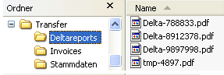
The folder “Deltareports” is copied via SCP to a remote system (JobMode 50 – SFTP put). |
|
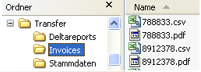
The folder “Invoices” fetches data from a remote file server via an smbclient (JobMode 1 – smbclient). |
|
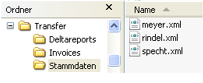
The folder “Stammdaten” fetches data from a remote file server via SFTP (JobMode 12 – SFTP get). |
TransInputDirectory = /cache/cold/Transfer
TransConfigFile = <ColdConfigDirectory>/transfer.ini
transfer.ini:
# Process all directories
TransIgnoreNotConfiguredDirectories = No

# Deltareports
[Deltareports]
JobMode_Transfer       = 50
TransBinary            = /bin/sftp
TransUserName          = sysadm
TransShare             = 53.113.173.116
TransWorkDir           = /cache/input
TransAcceptLogFile     = <ColdLogsBaseDirectory>/<SpoolType>/deltareports_<SpoolType>.log
TransInputDirectory    = /cache/cold/Transfer/Deltareports
TransIgnoreConnectErrors = No
TransDeleteTransferedFiles = Yes
TransFileNameMask      = Delta-.*\.pdf

# Invoices
[Invoices]
JobMode_Transfer   = 1
DataInputPath      = <ColdSpoolBaseDirectory>/<SpoolType>/<SpoolType.Generation>
IndexFileExtension = csv
DataFileExtension  = pdf
MaximumFilesSpool  = 500
TransUserName      = sysadm
TransUserPass      = password
TransWorkgroup     = Arbeitsgruppe
TransShare         = //192.168.1.23/data
TransWorkDir       = invoice
TransFileNameMask  =
TransAcceptLogFile = <ColdLogsBaseDirectory>/<SpoolType>/invoices_<SpoolType>.log

# Stammdaten
[Stammdaten]
JobMode_Transfer   = 12
TransBinary        = /bin/sftp
TransUserName      = sysadm
TransShare         = 53.113.173.116
TransWorkDir       = /cache/input
TransFileNameMask  = .*\.<IndexFileExtension>
TransAcceptLogFile = <ColdLogsBaseDirectory>/<SpoolType>/stammdaten_<SpoolType>.log
JobMode 98 – module HRDMS
This JobMode is contained in a module package, which can be included in cold.<SpoolType>.ini as follows:
IncludeExternalModule = HRDMS::ZRK
Since the package is customized, the currently specified values are listed in the parameter overview as well.
|
Parameter |
Value |
|---|---|
|
Configuration Parameters with Customized Default Values |
TransWorkDir = <target directory> TransFileNameMask = .+(<IndexFileExtension>|<DataFileExtension>) TransDeleteTransferedFiles = Yes Transfer::MaximumFilesSpool = 0 - Is only changed for Transfer so any number of files is accepted TransInputDirectory = <ColdDocsBaseDirectory>/<SpoolType>/<SpoolType.Generation>/ - Only files below EPA_IA_* are transferred TransIgnoreConnectErrors = No TransCheckMinimumDiskFree = 0 |
|
Table 189: Transfer: JobMode 98 – module HRDMS |
|
Docs directory after Transfer:
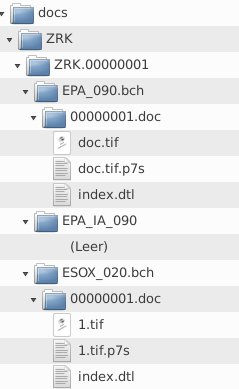
All ZIP files below “EPA_IA_*” are transferred and the source files are deleted afterwards. The directory EPA_IA_090 in the example above is empty.
Example content of transfer.<SpoolType>.ini:
#
# Konfigurationsdatei für den Transfer JobMode 98
#
# Der JobMode ruft für jedes Verzeichnis im <TransInputDirectory> einen
# anderen JobMode auf. Dadurch lassen sich mehrere Transfer Jobs bündeln,
# oder der passende automatisch aus dem Verzeichnisnamen ermitteln.
#
# Aufbau:
#
# [Verzeichnisname]
# JobMode_Transfer = ?
# sonstigeVariablen = ...
#
# Die Namen der Variablen sind identisch mit der cold.[Spooltype].ini Datei
# Wird eine Variable nicht angegeben, so wird der Inhalt der Variablen aus
# der cold.[Spooltype].ini verwendet. Wird eine Variable leer angegeben,
# so wird diese auch leer verwendet!
#

# Wird dieser Parameter auf Yes gesetzt, so werden nicht konfigurierte Verzeichnisse
# ignoriert.
# Wird er auf No gesetzt, beendet sich Transfer mit einer Fehlermeldung wenn ein
# nicht konfiguriertes Verzeichnis gefunden wird.
#
TransIgnoreNotConfiguredDirectories = No

# Üblicherweise geht Transfer in den Retry wenn keine Daten transferiert wurden.
# Dies macht aber keinen Sinn wenn Transfer Daten wegtransferieren soll und innerhalb
# einer COLD Kette (also nicht an erster Stelle) aufgerufen wird. Für diesen Fall ist
# es möglich trotzdem den nächsten Schritt zu starten (TransContinueOnNoData = Yes)
#
TransContinueOnNoData = Yes


[EPA_IA_020]
JobMode_Transfer = 50
TransWorkDir = /EPA_TCOM_S
TransInputDirectory = <ColdDocsBaseDirectory>/<SpoolType>/<SpoolType.Generation>/EPA_IA_020

[EPA_IA_030]
JobMode_Transfer = 50
TransWorkDir = /EPA_TSBS_S
TransInputDirectory = <ColdDocsBaseDirectory>/<SpoolType>/<SpoolType.Generation>/EPA_IA_030

[EPA_IA_040]
JobMode_Transfer = 50
TransWorkDir = /EPA_TSES_S
TransInputDirectory = <ColdDocsBaseDirectory>/<SpoolType>/<SpoolType.Generation>/EPA_IA_040

[EPA_IA_050]
JobMode_Transfer = 50
TransWorkDir = /EPA_VES_S
TransInputDirectory = <ColdDocsBaseDirectory>/<SpoolType>/<SpoolType.Generation>/EPA_IA_050

[EPA_IA_060]
JobMode_Transfer = 50
TransWorkDir = /EPA_TPG_S
TransInputDirectory = <ColdDocsBaseDirectory>/<SpoolType>/<SpoolType.Generation>/EPA_IA_060

[EPA_IA_070]
JobMode_Transfer = 50
TransWorkDir = /EPA_DFL_S
TransInputDirectory = <ColdDocsBaseDirectory>/<SpoolType>/<SpoolType.Generation>/EPA_IA_070

[EPA_IA_080]
JobMode_Transfer = 50
TransWorkDir = /EPA_TMD_S
TransInputDirectory = <ColdDocsBaseDirectory>/<SpoolType>/<SpoolType.Generation>/EPA_IA_080

[EPA_IA_090]
JobMode_Transfer = 50
TransWorkDir = /EPA_TMO_S
TransInputDirectory = <ColdDocsBaseDirectory>/<SpoolType>/<SpoolType.Generation>/EPA_IA_090

[EPA_IA_100]
JobMode_Transfer = 50
TransWorkDir = /EPA_ACB_S
TransInputDirectory = <ColdDocsBaseDirectory>/<SpoolType>/<SpoolType.Generation>/EPA_IA_100

[EPA_IA_110]
JobMode_Transfer = 50
TransWorkDir = /EPA_GAC_S
TransInputDirectory = <ColdDocsBaseDirectory>/<SpoolType>/<SpoolType.Generation>/EPA_IA_110

[EPA_IA_120]
JobMode_Transfer = 50
TransWorkDir = /EPA_PUI_S
TransInputDirectory = <ColdDocsBaseDirectory>/<SpoolType>/<SpoolType.Generation>/EPA_IA_120

[EPA_IA_200]
JobMode_Transfer = 50
TransWorkDir = /EPA_VES_S
TransInputDirectory = <ColdDocsBaseDirectory>/<SpoolType>/<SpoolType.Generation>/EPA_IA_200

# Tu nichts fuer folgende Verzeichnisse
[EPA_130.bch,EVA_040.bch,EPA_010.bch,EPA_020.bch,EKA_020.bch,ESOX_020.bch,EVA_020.bch,EPA_030.bch,EPA_040.bch,EPA_050.bch,EKA_050.bch,EPA_060.bch,EPA_070.bch,EPA_080.bch,EPA_090.bch,EPA_100.bch,EPA_110.bch,EPA_200.bch,EPA_120.bch,EGA_020.bch]
JobMode_Transfer = 99