Enable Firefox access to OWA/MailApp (certificate trust issue)
In recent Firefox versions (since version 55) the default security trust settings have changed, which can cause an internal error “SEC_ERROR_UNKNOWN_ISSUER” that blocks ImageMaster OWA and MailApp access. To avoid this issue, do the following:
-
Open Firefox (or a new tab).
-
Type “about:config” in the address bar and hit “enter”.
-
Find the preference “security.enterprise_roots.enabled” and change its value to “true”:
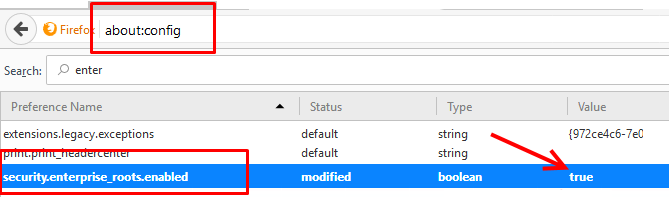
Figure 399: Enable OWA/MailApp access for Firefox