Note: For advanced workflow requirements with visual design capabilities, consider using ImageMaster Processing Services as an alternative or complement to traditional Batch Processing approaches.
ImageMaster Batch Processing1, represents an approach of process automation in the ImageMaster back end. Batches of electronic documents are imported or exported via the ImageMaster File Interoperability Service (FIS) with additional processing steps like format conversions or file checks.
Procedures for data preparation, validation, archiving or export are automated based on customizable scripts. The overall workflow jobs are controlled by the Scheduler.
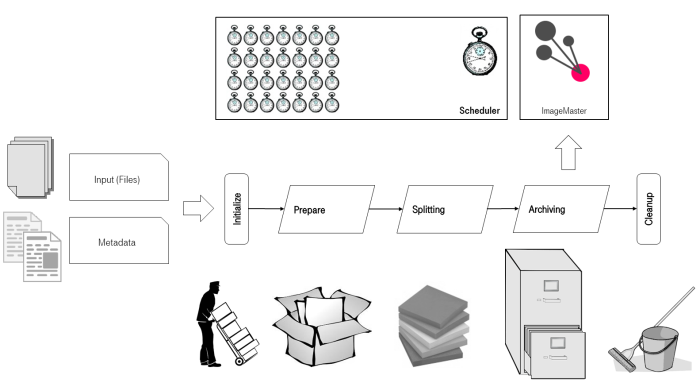
Figure 906: Batch Processing – import stages
Standard processing stages
ImageMaster Batch Processing is a modular system consisting of components which can be combined according to individual project requirements. In the different processing stages documents with belonging metadata are transferred via predefined directories in a file system. A typical chain of steps covers the following stages:
-
Initialize:
Receive the input packages (documents + metadata) and check if new input is available. -
Prepare:
Transform the incoming metadata into an internal standard format, e.g. based on CSV or XML. -
Splitting:
Create batches of input packages suited for ImageMaster import (e.g. via FIS). -
Archiving:
Import the packages to make them available as ImageMaster 9 document revisions. -
Cleanup:
Remove obsolete input files and intermediately generated files from the working directories.
The Scheduler manages the overall processes with their chronological executions and it triggers single batch processes. In the preparation stage the supplied data is parsed and transformed into a format with a structure that is suited for import into ImageMaster. These processing steps must always be customized to satisfy individual project requirements.
Example scenario
Digitized documents from a scan provider together with their belonging metadata are supplied in a predefined file system location. In addition, a backlog of digitized documents from an old system, soon to be decommissioned, is provided alongside.
Two dedicated processes for preparation and import are designed to cover both input scenarios. Both transfer incoming documents into a uniform ImageMaster repository. All documents can later be retrieved via the ImageMaster Client. Any further mechanisms of ImageMaster can be applied, for example, to manage the life cycle of these documents. Incoming metadata determines which retention periods apply per document, how long delete protection must be sustained, and when an automatic deletion must be triggered.
For more information see the system manual [SM Batch Processing]