The ImageMaster archive model supports redundant storage and logical separation of content. The model is based on the following building blocks:
-
realms (for logical separation of content in the data store)
-
physical archives (represented by storage technologies such as file servers or RAID systems)
A realm is a string telling a name for some logical location the files of a document revision shall belong to. The semantic given to this name depends on the view the inventor of this name has onto the system. For example, business cases may want to define realms on behalf of the document type and therefore call them ‘Invoices’ or ‘Technical documents’. In contrast, an operator may want to organize its model in terms of the document creation time and have some aging coded in the realm, e.g. ‘October2010’.
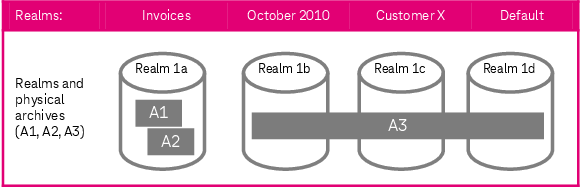
Figure 750: ImageMaster storage management – building blocks example
In the example figure above, realm 1a is mapped to the two physical archives A1 and A2. A physical archive can be used by several realms as being depicted by A3 in the example. An archive configuration can be designed to support physical segregation in a multi-tenancy environment (see chapter Multi-tenancy support).
Any archive configuration is typically characterized by the following parameters:
-
ID (a unique ID in the shape of a UUID)
-
archive name (a friendly name, which may be used for reference by administrators)
-
state (see Archive state below)
-
creation time (time of introduction of the archive)
Further specific connection parameters are required, which typically include:
-
the host name or IP address of the host where the file server runs
-
the port number at which the file server is listening for requests
-
the root path of the file system that is to be used for storing files
-
storage-specific parameters depending on the used system (see chapter Storage)
The state of an archive determines about the outcome of the three basic types of operations which can be distinguished in terms of “get operations”, “put operations”, and “delete operations”. The following modes are available:
-
online:
All operations (get, put, and delete) are possible.
-
read only:
Put and delete are impossible and return a corresponding error code.
-
offline:
None of the operations (get, put or delete) are possible and all return an error code.
Being able to control the archive state is useful in migration or maintenance scenarios, in particular whenever redundant archives are used in combination with Archive Recovery Management (see chapter ImageMaster Archive Recovery Management).