Authorization in the ImageMaster environment is based on a permission model, which has been designed with flexibility in mind to allow for a variety of specialized integration scenarios. In the Integration Service framework there is not any kind of hard-wired permission relationship, say between one document type and one user. Instead, a permission mapping is always done via roles which are assigned to users. Besides defining the accessible objects (such as complete document types with all their versions and metadata, or just a subset of document revisions, or even just parts of the metadata), the role also determines about the types of operations that are allowed.
Initial role assignment, configuration, and possibly even role customization will always be necessary for expedient employment of the Integration Service when setting up a new system. For this purpose an administration role is provided by the Integration Service by default. The role administrator may create, update or delete roles. This allows setting up and managing basic types of access permissions, which are internally encoded by the query language RAQL. For more complex roles it can be necessary to have RAQL queries devised and tested before installing them as part of a role definition. It is common practice in an Integration Service scenario to have at least a few customized roles defined and set up before entry into service. Such custom roles will then fit project-specific needs and they can simply be assigned to users by the role administrator.
Attaching permissions directly to documents is a scenario which can be modeled by means of the Integration Service. However, this is not hard-coded on purpose. Instead, the basic idea behind the RAQL-based role encoding is to attach permissions to items via queries and to combine the resulting constructs by role definitions. Typical permissions on items may include:
-
Create
-
Read
-
Update
-
Delete
-
Lock
-
Execute
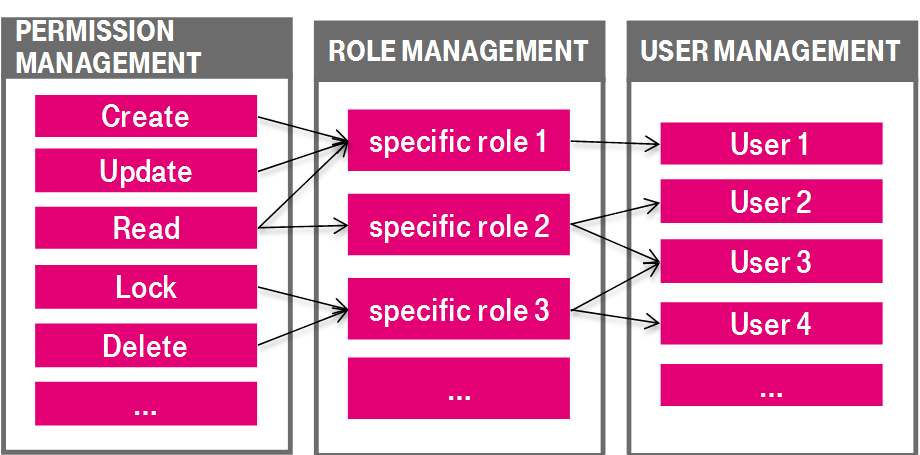
Figure 751: Permission model – permission / role / user management
An item itself is typically a document revision with content, yet it can be any entity from the underlying ImageMaster data model as it is exposed by the query language RAQL. Instead of a document revision, the permission can also target a complete document type, or even only a part of a document revision, such as one specific piece of content (e.g. one document file attachment out of possibly multiple attachments belonging to one document revision).
A query, which defines a role, can evaluate document attributes and determine about access depending on single attribute values of a document revision. Queries in general may either decide about a permissible result set of items and allowed operations or they can deny the permission for a set of operations. The internal modeling with RAQL queries also allows a combination of several complex roles into one new role.
Whereas most of the permissions refer to document-related items, the “execute” permission is tied to single web services or even to internal operations of the Integration Beans API. This allows the definition of a role which can, for example, only execute the service for archiving new documents, but not the service for retrieving documents.
Besides evaluating data from existing documents in the archive, a query can also extract information from the transient environment, such as the current user’s login name, or an attribute of an incoming document revision. This is mainly required to apply permissions in the context of an initially incoming document, e.g. to determine whether a user is allowed to archive documents of a specific type or with certain attribute values.
For further details on role customization and the query language RAQL see the Integration Service system manual [SM IS]
Within the Integration Service the ImaUserlibService provides the methods for managing users (e.g. assigning a role to a user), and the ImaAdminService provides the methods for role management (see chapter ImageMaster web services). When using the AdminClient, these services are used internally.
ImageMaster supports basic authentication and certificate-based authentication (SSL/TLS).