Session handling and expiry
When a user has been inactive for a while, an automatic logout will occur. The session expires and the user must log in again.
In a web client environment it can happen that a user wants to log in even though a web client session for this user already or still exists. Two reasons can account for this:
-
The user is logged in via another browser or from another system in parallel.
-
The existing session was not closed, e.g. due to a browser crash.
Since only one running session for each user is supported but the system cannot determine the exact status, in such a case the user is asked for a confirmation to terminate the other session. This procedure prevents accidental termination of the parallel session to avoid the loss of unsaved data.
History
The ImageMaster WorkplaceClient supports history lists for recent searches and recently opened documents. The history lists are only valid for the current session and will be cleared with session expiry or logout. For more details see topic Recently opened documents.
Activity in progress
When any activity is in progress, e.g. after starting a search or when sorting the hit list, the cursor temporarily changes its shape.
Browser settings
The following settings are required or recommended:
-
In the browser settings, cookies must be accepted and JavaScript must be activated.
-
The Internet Explorer compatibility view is not supported and must be deactivated.
-
Deactivate pop-up blockers for the site.
-
The browser security level must allow scripting and file downloading.
-
For an optimized behavior the script debugging features of the browser have to be disabled:
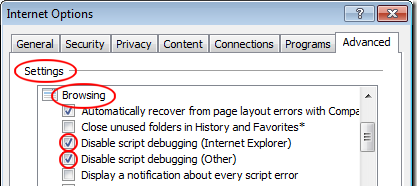
Figure 914: Recommended browser settings: disable script debugging