When doing an export of the assembly structure, the content of included parts is written to a server defined directory. Depending on the configuration, the content is either stored plain into a directory that has been created for the part, or a ZIP file is created for each part that is stored into the created export directory of the top-level part.
The export structure follows the schema as defined below. For each selected top-level part a separate directory is created in the export folder. The filename of the created directory or the ZIP file contains the primary keys and the foreign version.
Examples are:
-
V92812343000.A00.docType.zip (for a single primary key)
-
V9281234#3000.A00.docType.zip (for a combined primary key)
The content is created with the following structure:
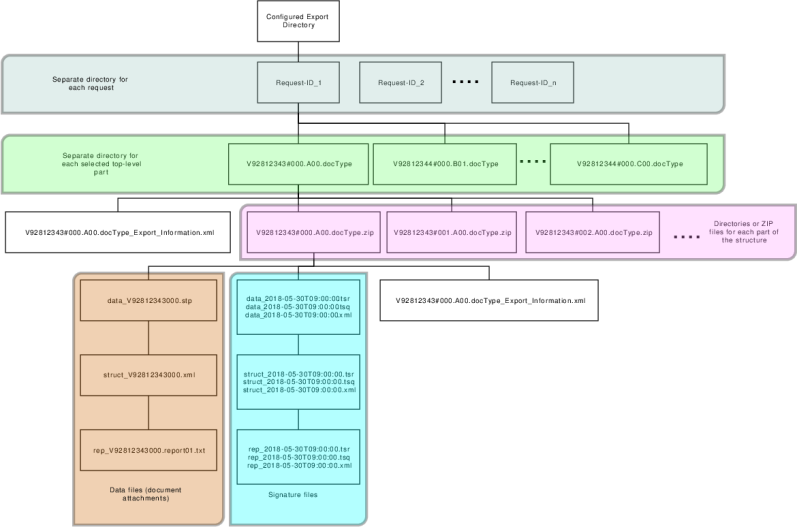
Figure 733: General export structure
|
Definition |
Example Name |
Description |
|---|---|---|
|
Top-level directory |
||
|
Export directory |
\\share\export3d |
This is the export path that must be configured in the 3D export settings. |
|
Request directory |
||
|
Directory created for each request <Request-ID> |
TH55UD-2018-07-01_10-50-48.123456 in case that the request ID is a combination of user ID and date/time |
A request can address multiple exports. For each request a separate directory is created, using the request ID as the directory name. |
|
Top-level part-related structure |
||
|
Top-level part directory <primary key(s)>.<Foreign Version> |
V9281234#3000.A00.docType |
Separate top-level part-related directory is created for each of the selected parts. For uniqueness a request ID is added to each directory. |
|
Export information file <primary key(s)>.<Foreign Version>_Export_Information.xml |
V9281234#3000.A00.docType_Export_Information.xml |
The file describes each top-level part-related export. |
|
Part-related directory or ZIP file <primary key(s)>.<Foreign Version> for plain directory <primary key(s)>.<Foreign Version>.zip for ZIP file creation |
V9281234#3000.A00.docType for plain directory V9281234#3000.A00.docType.zip for ZIP file |
A directory or ZIP file is created for each part involved in the export, belonging to the top-level part. |
|
Part-related files |
||
|
Content files (attachments of the document) Filenames are created based on the attachment's content key and the filename: <contentkey>_<filename> |
data_V92812343000.stp struct_V92812343000.xml rep_V92812343000.report01.txt |
These are all files that will be included according to the file extension configuration given in the export configuration. |
|
Export information file for each exported part <primary key(s)>.<foreign version>_Export_Information.xml |
V92812343000.A00.docType_Export_Information.xml for a single primary key V9281234#3000.A00.docType_Export_Information.xml for a combined primary key |
This file describes general information for the part for post processing. It has information about the overall request and the part itself, including all metadata. |
|
Part-related signature files with filenames as used in the repository |
data_2018-05-30T09:00:00.tsr data_2018-05-30T09:00:00.tsq |
Signature information can be included either by configuration by including the file extension in the export definition, or when performing the export with a signature verification. In this case they are included automatically. |
|
Table 408: Export structure elements and example names |
||