The dashboard overview page shows status and health check information for the ImageMaster Content Services for E-Mail, the ImageMaster Content Services for File Shares and the ImageMaster Services for ERP (for SAP integration).
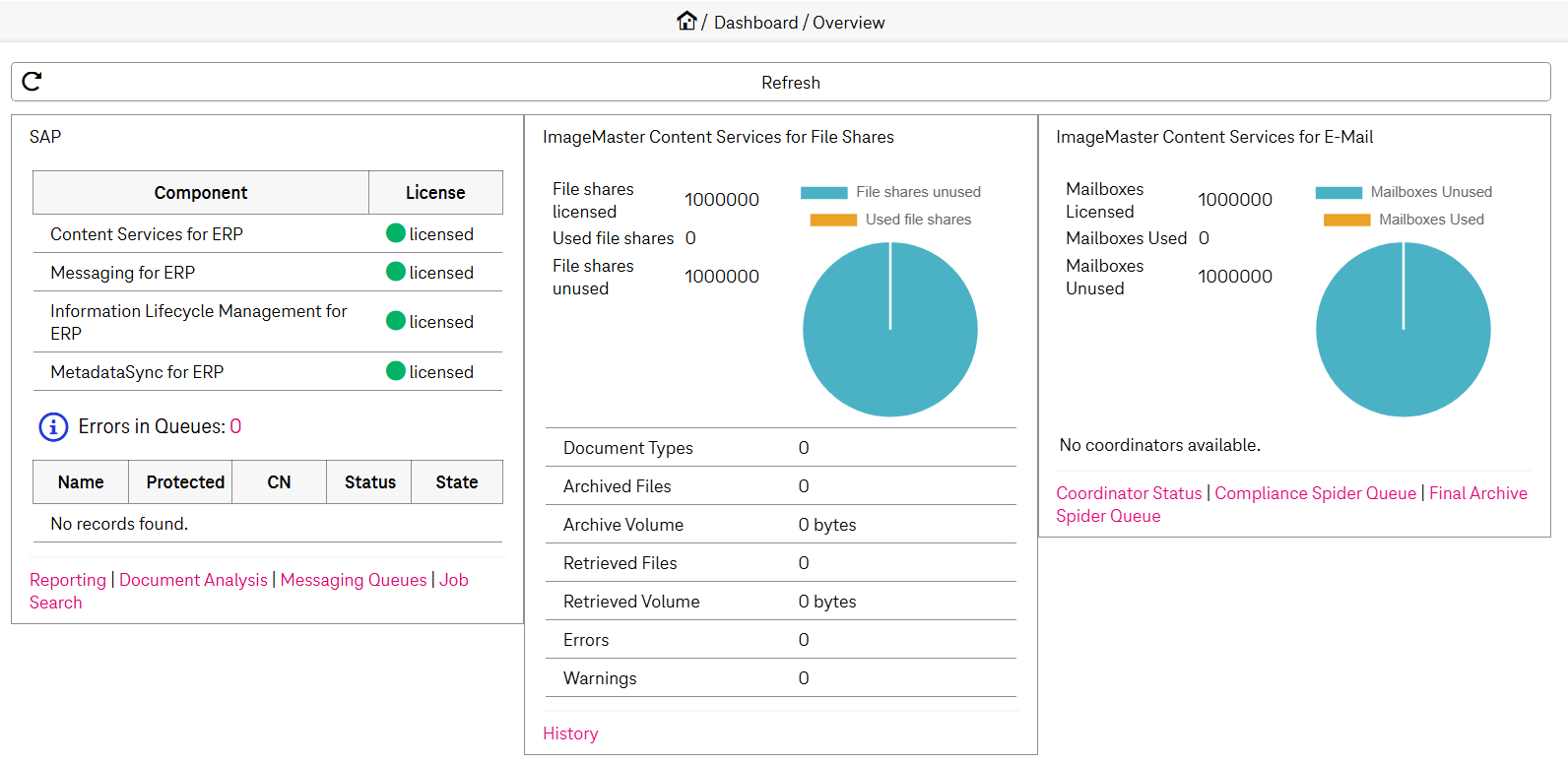
Figure 249: Dashboard – overview
Information is provided in tiles (one for each component). To navigate to a component-related page, click the corresponding link on the bottom of the tile.
ImageMaster Content Services for E-Mail overview
-
The ImageMaster Content Services for E-Mail overview provides status information about available and used mailbox licenses. The following information is available:
-
mailbox-related numbers (number of mailbox licenses, used, and unused number of mailboxes)
-
general status information of all configured Coordinators
A traffic light near the Coordinator name displays the status information:
-
green: no issues are reported concerning the actual Coordinator
-
red: error status, additional status text in red is available
Detailed information about Coordinators is shown on a Coordinator Status dashboard page. Use the correspondent link or click one of the listed Coordinators to reach this view.
-
-
ImageMaster file share archiving
The ImageMaster File Share Archiving overview presents the following information:
-
file share-related numbers (number of file share licenses, used, and unused number of file shares)
-
number of used doc types (license depending)
-
number of archived files
-
volume of archived files
-
number of retrieved files
-
volume of retrieved files
-
number of errors
-
number of warnings
ImageMaster service for ERP overview
The ImageMaster Services for ERP overview presents the following information that relates to SAP:
-
The licensed components (information is retrieved from the license file)
The following options are available:
-
green: a module is licensed
-
red: a module is not licensed
-
-
The current number of SAP Messenger documents that are in error state
The number of errors is presented as a link which points to the Messenger Queues dashboard page, which is also linked in the bottom of the overview. Clicking this link starts a search for all error items to present these in the dashboard page. If there are no errors, this information is not displayed at all.
-
The content repository status
This information is retrieved from the current configuration. The following options are available:
-
Protected: If the state is Yes, the field is shown with a green background, otherwise with a red one.
-
CN: This is the common name of the certificate of the repository.
-
Status: If at least one certificate is active, the status is Active and the field is shown with a green background, otherwise with a red one.
-
State: If the state is Running, the field is shown with a green background, otherwise with a red one.
If none of the SAP modules are licensed, only the license information is shown in the tile, whereas all the other content repository information is hidden.
-