There are multiple ways to include a Bearer token in a request, depending on the client tool being used.
-
Option 1: Manual token retrieval
Make a separate POST request to generate the Bearer token.
This token must then be included in the repository onboarding POST request by setting the Authorization type to “Bearer token”, and pasting the token into the token field.
-
To generate the Bearer token, you need the Token Service URL, Client ID, and Client Secret, all of which are retrieved from the service key.
-
In this case fetch the token using Basic Authentication from the Token Service URL (“uaa / url” from the service key) with grant_type=client_credentials:
https://imagemaster.authentication.eu20.hana.ondemand.com/oauth/token?grant_type=client_credentials
-
-
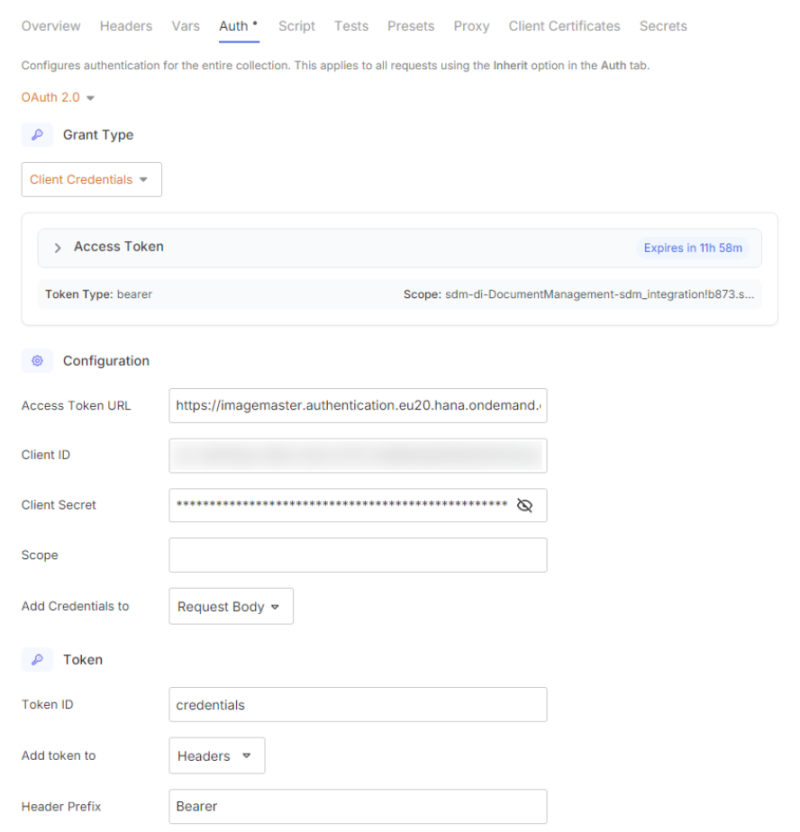
Option 2: Using OAuth 2.0 for automatic token generation
-
For the repository onboarding POST request, set the Authorization type to OAuth 2.0.
-
Under the “Configuration Options” tab, select “Configure New Token” to provide the necessary OAuth credentials.
-
An example of how to configure the API client is shown in the screenshot below: