If your administrator has enabled this function, you have the possibility to change the interface language and region settings. These setting override the language that is set as default for the currently logged-in user and the regional settings that are chosen automatically on selecting a language:
-
Select Language Settings in the user configuration room:
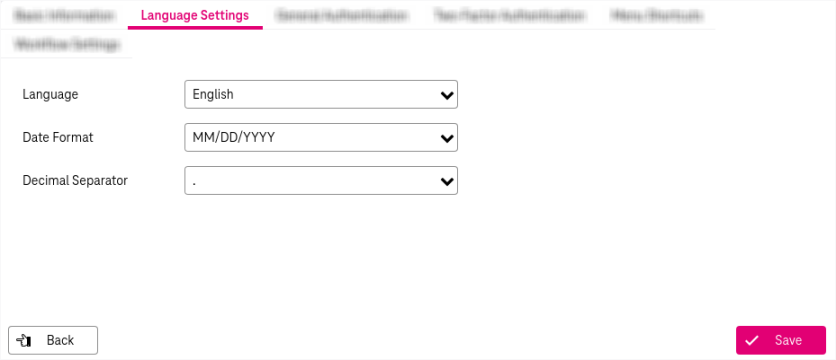
Figure 776: Language settings
-
Adjust the following fields:
-
Language: Select a language from the list. This change is reflected immediately. The language settings will be saved for the logged-in user.
-
Date Format: Select the preferred format.
-
Decimal Separator: Select the preferred separator. (The thousand separator is always the counterpart of the decimal separator. So if you select the dot as decimal separator, the thousand separator is a comma and vice versa.)
-
-
When ready, click Save. To return to the previous browser page, click the button Back.
Alternatively you can switch the language for the current session temporarily by clicking the spoke wheel icon in the functional bar and selecting Switch Language:
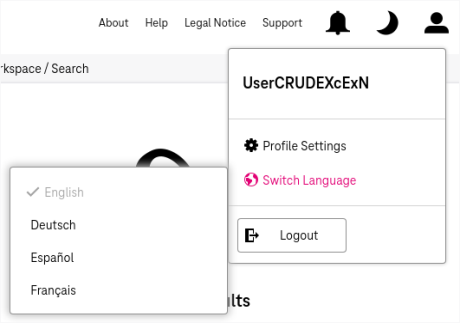
Figure 777: Switch language temporarily
In addition to the predefined languages, additional languages can be made visible and used if they are enabled by the administrator.
When extra language bundles are registered, they become available in all standard language selectors. If a selected custom language is later disabled, the system automatically falls back to English.
The maximum number of active languages is limited (up to 10, including predefined ones).