Hitachi Content Platform (HCP)
ImageMaster supports the Hitachi Content Platform (HCP) storage technology, which requires configuration via a dialog as shown below:
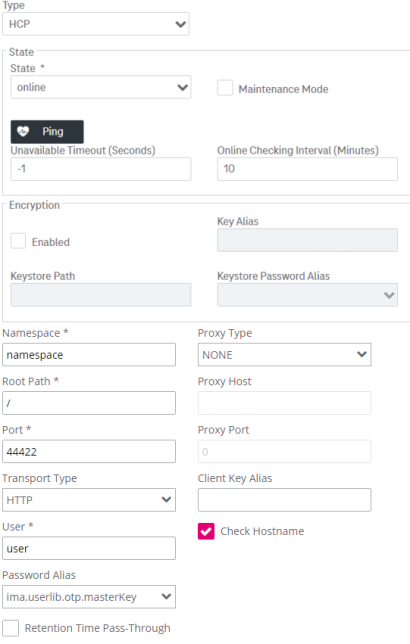
Figure 77: Archives – HCP archive properties
See the table beneath for the HCP parameter descriptions:
|
Parameter |
Mandatory |
Description |
|---|---|---|
|
Namespace |
Yes |
The namespace of the archive (this is a URL like ns.tn.myhitachi.com where “tn” is the tenant and “ns” is the namespace and the rest is the hostname) |
|
Root Path |
Yes |
The root path in the file system for this archive |
|
Port |
Yes |
The port address for access to HTTP / HTTPS |
|
Transport Type |
Yes |
The transport type – either HTTP or HTTPS |
|
User |
Yes |
The user ID for authentication to access the namespace |
|
Password Alias |
Yes |
The password alias for accessing the HCP |
|
Retention Time Pass-Through |
N/A |
If unchecked (the default state), retention times are not written. If checked, possible retention times are written to the underlying file system that supports hardware retention times. |
|
Proxy Type |
Yes |
The following values are supported:
|
|
Proxy Host |
Depends |
The host of the proxy, which is mandatory in case of the Dedicated proxy type |
|
Proxy Port |
Depends |
The port of the proxy, which is mandatory in case of the Dedicated proxy type |
|
Client Key Alias |
No |
The client key alias that will be used for certificate-based authentication in HTTPS |
|
Check Hostname |
N/A |
If checked (the default state), the server certificate hostname will also be checked in the authentication process |
|
Table 23: Archives – HCP |
||
For HCP storage, the ping operation for archives according to chapter Operations with archives only works as soon as the first document has been archived.