Operations with archives
Click the Archives > Archives tab to configure the properties of the archives.
You can perform the following actions with archives:
-
add / delete archives in the system
-
change the archive properties
To add / delete archives
-
Do one of the following:
-
Click Add Archive to specify a new archive.
-
Alternatively, click Copy Archive to add an archive with the same values as the currently selected one.
-
-
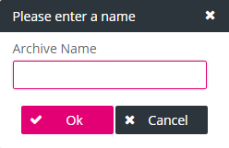
An archive creation dialog is displayed. Enter the name of the new archive and click OK. The new archive appears in the list of existing archives.
-
Click Delete Archive to remove the selected archive and confirm.
-
Click Save to finalize the settings.
To modify an archive configuration
-
Select an archive configuration in the list of archives (according to figure Archives).
In a simple scenario, there will only be one archive configuration, which you may want to denote as “Standard”.
-
Adjust properties on the right-hand panel. Mandatory fields are marked with an asterisk (*).
There are the following groups of properties for each archive type:
-
The general properties in the top area are common for all storage types.
See Archives – general.
-
The type-specific properties located below refer to specific storage types.
See the corresponding subsections of chapter Type-specific properties.
-
-
The availability of a selected archive can be checked by clicking Ping.
It can be the case that the ping only works after the first document has been archived!
If you click Ping for the first time in a new environment, an error message may still be displayed. This was e.g. observed for HCP Storage because the ping checks for the existence of a root path, which must initially be created by the storage system. In such a scenario, you must ensure that the root path has been created beforehand. With HCP storage this can be achieved, for example, by archiving a document.
-
Click Save.
Make sure to enter a correct location path which is not yet in use as files therein can be overwritten without any notice!