References configuration
The references configuration allows you to link document types in order to have master data managed centrally in one document type. A typical example of master data is an address that can be used in several other document types such as invoices or payrolls. In general you may also create multiple master document types and connect your detail document type with several different master documents via an attribute.
To configure references
-
Click the Reference tab to connect data from one document type (a detail document type) with the data handled by another document type (master document type).
Example:
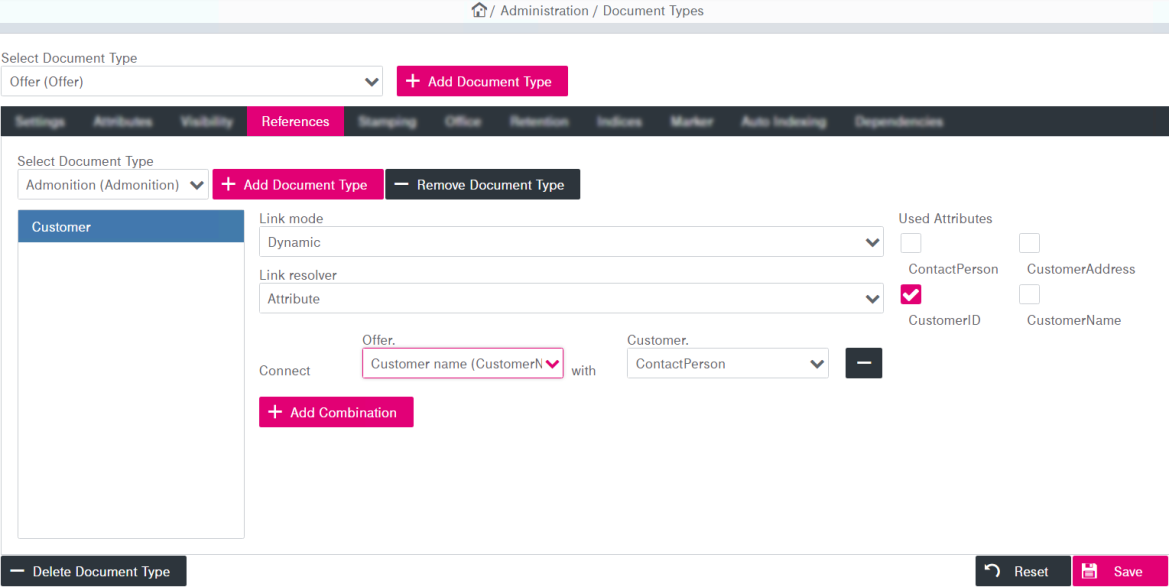
There may be a document type “Offer” within the system which shall serve as the central document type to manage customer contact master data. This type contains a unique attribute “Contractor” that will serve as a link between the two document types. It also contains a number of “used attributes” that can be substituted into the detail document type – i.e. in a search on the detail document type they will behave as if they were normal attributes of the detail document type. These attributes however are not editable in the detail document type (only in the master document type).
-
Define the following parameters for each document type reference:
-
Link Mode: The parameter defines which revision of the linked master revision will be used. The following options are available:
-
Fixed revision: The displayed values are fixed to the master revision resolved by the link. A check-in of new revisions on the master document does not affect the content of the linked attributes in the detail revision.
-
Latest revision: The detail revision always displays the values of the latest revision of the master document. If a new revision of the master document is checked in, the detail revision will reflect these updates in its linked attributes.
-
Freeze on update: This is the same as the “latest revision” as long as the detail revision itself is the latest revision of its document. Updates to the master document are also reflected in the detail revision. As soon as the detail revision becomes no longer the latest revision of its own document (after a check-in of a new revision), the linked attributes are frozen to those of the latest revision of the master document at that time. Any further updates in the master document will no longer be reflected in the detail revision.
-
Dynamic: This mode differs from the other link modes. The dynamic links do not establish a fixed relationship between the detail and master revision. Instead, the link is resolved each time the detail revision is searched and it shows the values of the latest revision of the target document at the time of retrieval. Due to this dynamic relationship, it is allowed to create a detail revision without a matching master revision (the linked attribute value would be empty) or with multiple master revisions (the linked attribute would behave like a multi-value attribute), and it is allowed to delete a master revision while it is still being referenced through a dynamic link. Only dynamic links can be removed from a persistent document.
-
-
Link Resolver:
-
Attribute: You can select the two connecting attributes with the provided drop-down menus. The first menu specifies the attribute of the source document type and the second menu specifies the attribute of the linked document type.
-
Query: Enter a query.
-
Extension: Define the class name of the extension.
-
-
Used Attributes: Select the boxes for the corresponding attributes to use them.
-
In figure Document types – references below, a detail document type “Offer” is being linked with the master document type “Customer” via the attribute “CustomerID”:
Preconditions for creating references
References can only be created when creating a document type for the first time before saving it! An existing document type cannot be extended by a reference and thus cannot become a detail document type! There is only one exception: it is possible to add and remove dynamic links (with Link mode = Dynamic) and Link resolver = Attributes.
When you create a reference, the following preconditions must be fulfilled:
-
A master document type has been created and saved with all of the attributes that are to be referenced.
-
The detail document type that is being created must not be saved until finalization of the reference configuration.
-
The linking attributes in the detail and in the master document types must be of the same type.
-
The linking attributes – both, in the detail and in the master document types – must be of the type “single-value”.
“Single-value” means that the values of Minimum Occurrence and Maximum Occurrence configured on the Settings tab, must be set to “1”; see the example in the figure below and refer to table Document types – attributes: basic parameters for a parameter description.
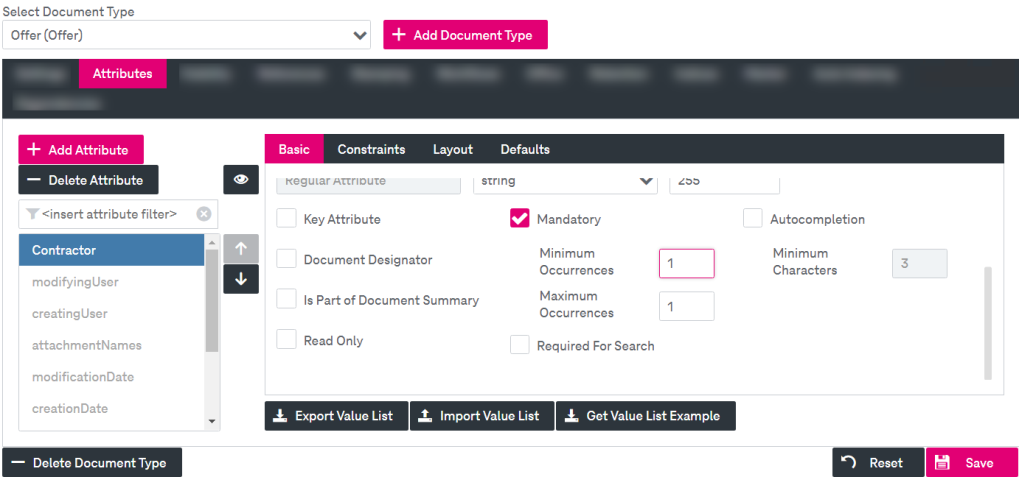
Figure 97: Document types – attributes: single-value attribute configuration
For further illustration, also see the linking attributes scenario in chapter Configuring a reference.