-
Create a subaccount, if it does not already exist:
-
Go to BTP Cockpit, e.g. https://emea.cockpit.btp.cloud.sap/cockpit
-
Create a subaccount and space: https://help.sap.com/docs/document-management-service/sap-document-management-service/creating-subaccount-and-space
-
-
Create a “Document Management Service, Integration Option” service instance:
-
Create a service instance of “Document Management Service, Integration Option” using the desired plan and the previously created space: https://help.sap.com/docs/service-manager/sap-service-manager/creating-service-instances-in-cloud-foundry?locale=en-US
-
It is sufficient to follow the section “Creating Service Instances from your Subaccount”.
-
The optional step “Configure instance parameters” is not necessary.
-
-
-
In the instance, create a new service key: https://help.sap.com/docs/service-manager/sap-service-manager/creating-service-keys-in-cloud-foundry?locale=en-US
The following properties from this key are required for the next steps of the setup:
Service key property
endpoints → ecmservice → url
Client ID
uaa → clientid
Client Secret
uaa → clientsecret
Token Service URL
uaa → url
-
Create an HTTP destination:
-
In SAP BTP, go to Connectivity → Destinations and create a new destination.
-
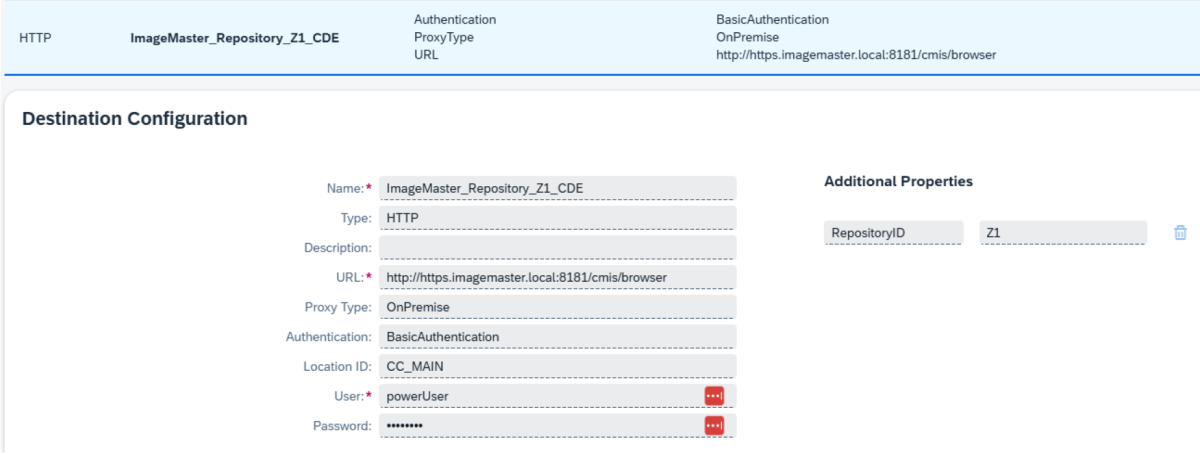
Insert the required parameters:
-
Name: Name of the destination to be created
-
Type: HTTP
-
Description: optional
-
URL: Any custom URL, will be used in Cloud Connector configuration
-
Proxy Type: OnPremise
-
Authentication: Basic Authentication
-
Location ID: Optional
-
User + Password: Any ImageMaster user that hat access to the CMIS repository in ImageMaster and the necessary permissions (see Permission concept for the example of a minimal role)
-
Additional Properties: “RepositoryID” = “<cmis repository ID in IM>”
Example parameters:
-
-
-
Create an external repository in the “Document Management Service” using the “Administrative Operations” API: https://api.sap.com/api/AdminAPI/resource/Repository_Management
To onboard an external repository (Document Management Service’s cloud repository), use the repository onboard REST API with a REST client. The endpoint URL for your tenant can be constructed by concatenating the ECM URL (retrieved from the Document Management Service, Integration Option in the service key) and “rest/v2/repositories”.
An example endpoint is:
https://api-sdm-di.cfapps.eu20.hana.ondemand.com/rest/v2/repositories
-
The ECM URL varies depending on the service provider and the region of the subaccount.
-
All Document Management Service operations use OAuth2 (OAuth2ClientCredentials) for authentication.
There are multiple ways to include a Bearer token in the request. For details see Bearer token handling in CMIS integration.
-
Option 1: Manual token retrieval
-
Option 2: Using OAuth 2.0 for automatic token generation
-
-
To onboard the repository, send a POST request:
POST to “<ECM URL>/rest/v2/repositories”, e.g.
https://api-sdm-di.cfapps.eu20.hana.ondemand.com/rest/v2/repositories
-
with content-type “application/json”
-
depending on your selected option (1) with the Bearer token or with (2) “Authorization = OAuth 2.0”.
-
Use the following minimal body:
where
-
destinationName is equal to the destination in BTP
-
repositoryId is equal to Additional Property (BTP) of that destination (and ImageMaster)
CopyExample configuration in POST request body for onboarding a repository{
"repository": {
"displayName": "Z1",
"description": "Repository Z1 on ImageMaster used via Destination and CC",
"repositoryType": "external",
"repositoryId": "Z1"
},
"connection": {
"destinationName":"ImageMaster_Repository_Z1_CDE"
}
} -
-